NEW

Introducing Account 360

A single operational view of all your accounts with health scoring, inline editing, and activity tracking.

Explore Account 360 →

CRM for Asset Managers

Manage investor relationships, fundraising, onboarding and fund information in one CRM, built on Microsoft Dynamics 365 for asset management firms.

From prospect to funded investor

One connected process across fundraising, onboarding, approvals and ongoing investor management.

01
Prospect
Profile prospective investors and key contacts, including investor type, jurisdiction, strategic importance and relationship information.
02
Opportunity
Track institutional opportunities, fund interests, expected commitments, consultants and other stakeholders involved in the decision.
03
Commitment
Record the agreed commitment against the relevant investor, fund and share class, ready to move into onboarding.
04
Onboarding
Manage onboarding tasks, legal entities, beneficial owners, required documents and progress through a structured process.
05
Approval
Capture KYC and AML information, route approvals to the right teams and maintain a clear record of sign-off.
06
Funded
Maintain subscriptions, transactions, holdings and valuations once the investor is active and the relationship is ongoing.
What's included

The information your team may still be managing across spreadsheets

CRM for Asset Managers brings investor, fund and relationship information together in one managed Dynamics 365 solution.

Investor 360

Investor information in a consistent, reportable format

Keep investor type, jurisdiction, regulatory classification, AUM, strategic tier, risk rating and KYC status in structured CRM fields.

Investor type Pension
Classification Professional
Status Invested
AUM £1.09bn
Contact intelligence

Understand who is involved in the investment decision

Capture role, seniority, decision influence, committee membership and product interests against each contact.

Influence
mix
Decision makers
Key influencers
Gatekeepers
Other contacts
Fund master

Funds, strategies and share classes as CRM data

Maintain the reference information used across investor records, opportunities and holdings.

European Equity Sterling Credit
Positions and flows

Keep holdings and transactions connected

Record subscriptions, redemptions and transfers against investor positions and update holdings as prices change.

Rolling 8 quarters Net flows +18.4%
Onboarding and KYC

Manage onboarding through one structured process

Use checklists to manage legal entities, beneficial owners, documents and approvals from commitment through to activation.

72%
Entity structure captured Beneficial owners verified KYC evidence received Committee approval pending
Meeting intelligence

See the health and activity of the investor relationship

Capture meetings, actions and sentiment, while activity measures help teams identify relationships that may need attention.

Last interaction 18 days
Open follow-ups 2
Meeting cadence Quarterly
Reporting and analytics

Use CRM data for pipeline, onboarding and investor reporting

Bring the same information into Dynamics 365 dashboards and Power BI without recreating the underlying data model elsewhere.

Inside the app

See how the core processes work in Dynamics 365

Explore how investor information, funds, opportunities and onboarding are managed within CRM for Asset Managers.

A complete view of the investor relationship

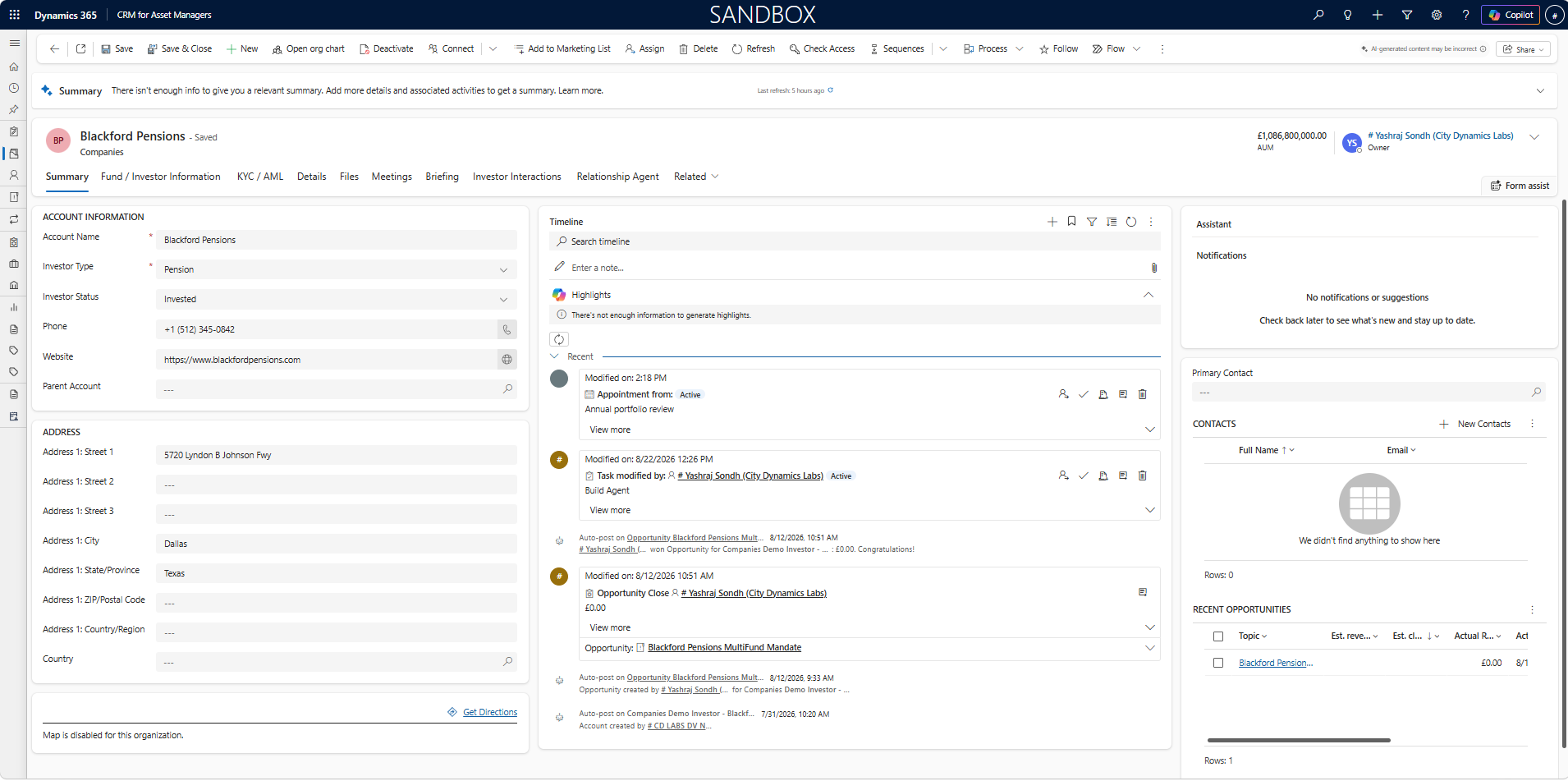
Extend standard Dynamics 365 Account and Contact records with the information asset management teams need to manage each relationship.

  • Investor classification, AUM, KYC and relationship information.
  • Investment role, decision influence, committee membership and product interests.
  • Structured data that can be searched, segmented and reported on.
Contact investment profile
Investor 360 record in Dynamics 365

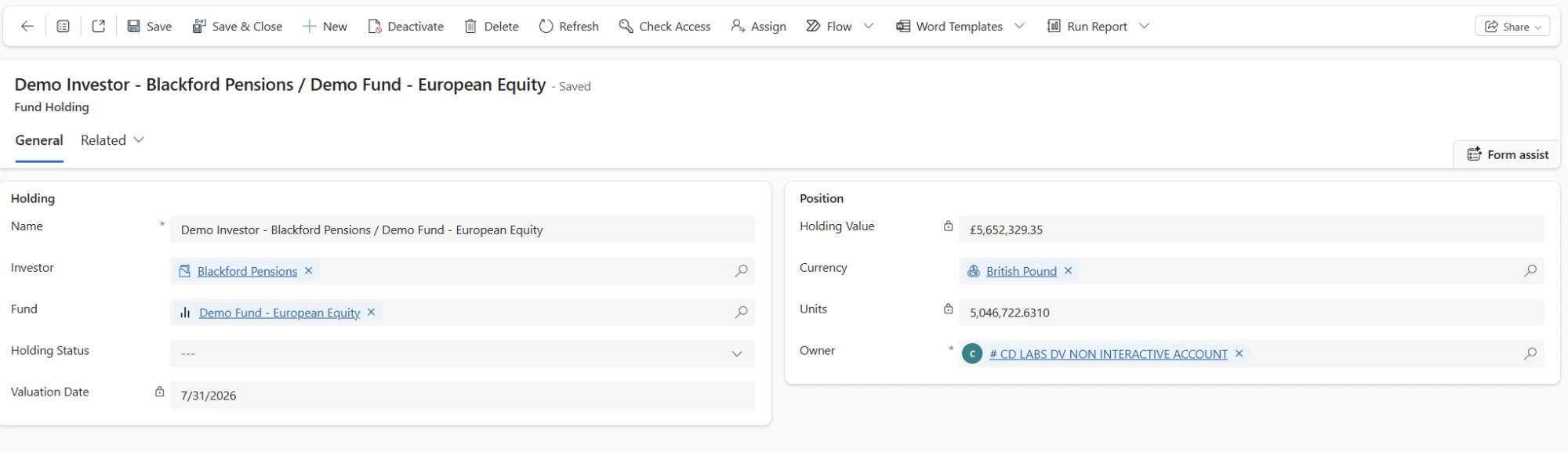
Keep funds and holdings connected to the investor

Manage fund and share class information in Dynamics 365 and connect it directly to the investors and opportunities that relate to it.

  • Fund and share class information linked to investor records.
  • Subscriptions, redemptions and transfers recorded against holdings.
  • Positions updated as transactions and prices are recorded.
Fund holding record
Fund holding record in Dynamics 365

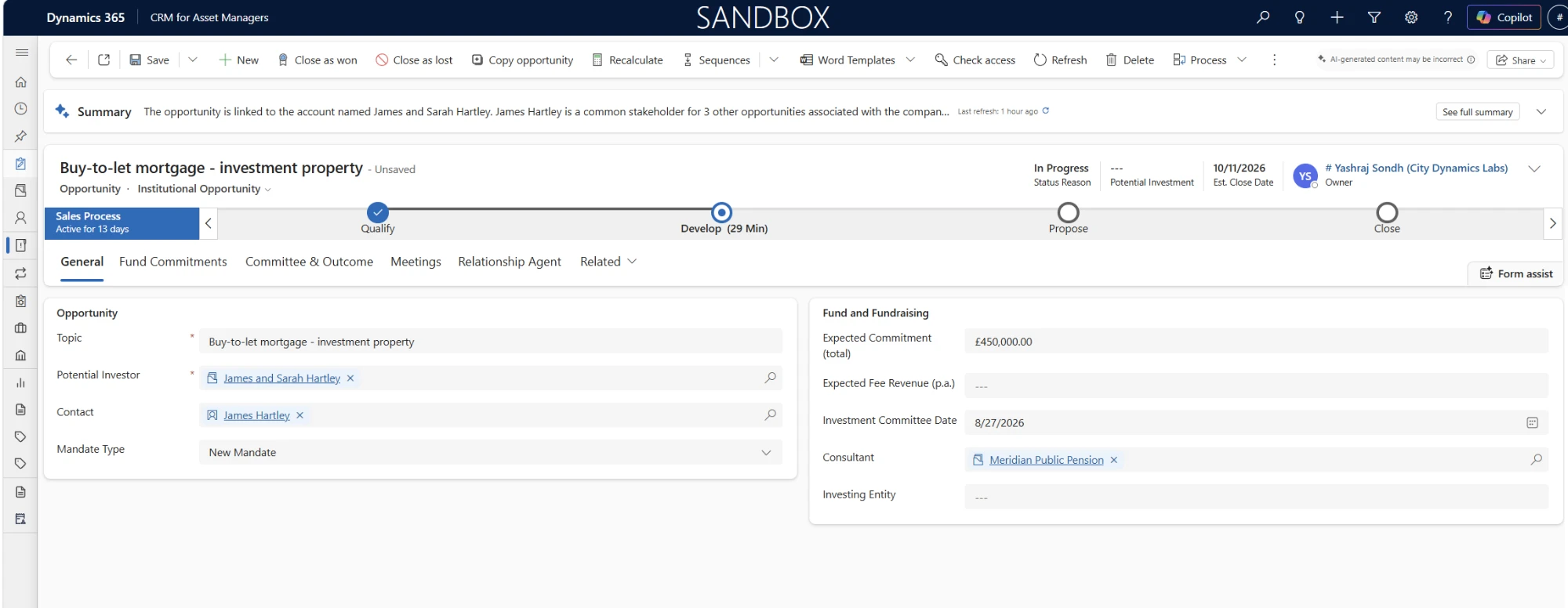
Manage the institutional pipeline

Track long institutional sales cycles with the information distribution teams need against each opportunity.

  • Expected commitment and fee revenue.
  • Investment committee dates, consultants and investing entities.
  • Multiple funds associated with the same mandate.
Institutional opportunity
Institutional opportunity in Dynamics 365

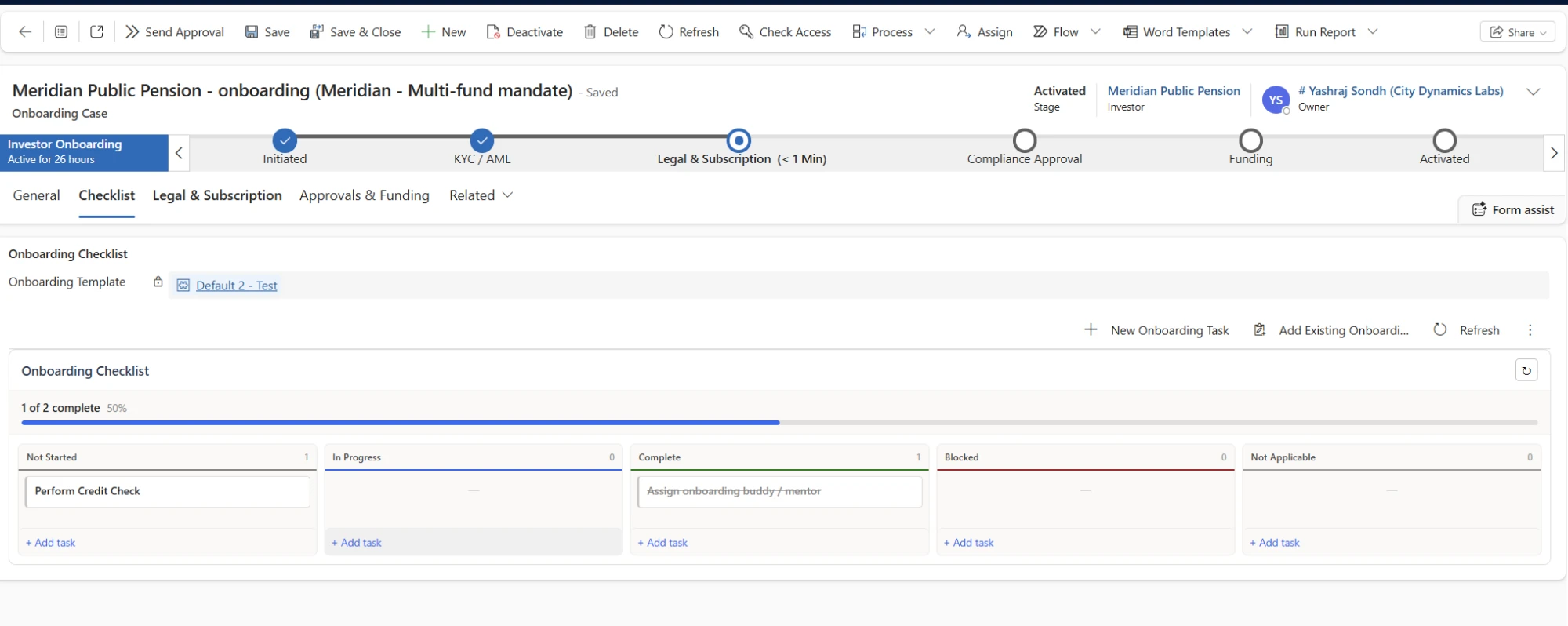
Manage investor onboarding and KYC

Keep the stages between winning an opportunity and activating the investor within one structured CRM process.

  • Configurable onboarding checklists and progress.
  • Legal entities, beneficial owners and subscription documentation.
  • KYC, AML and approval steps managed together.
Investor onboarding case
Investor onboarding case in Dynamics 365
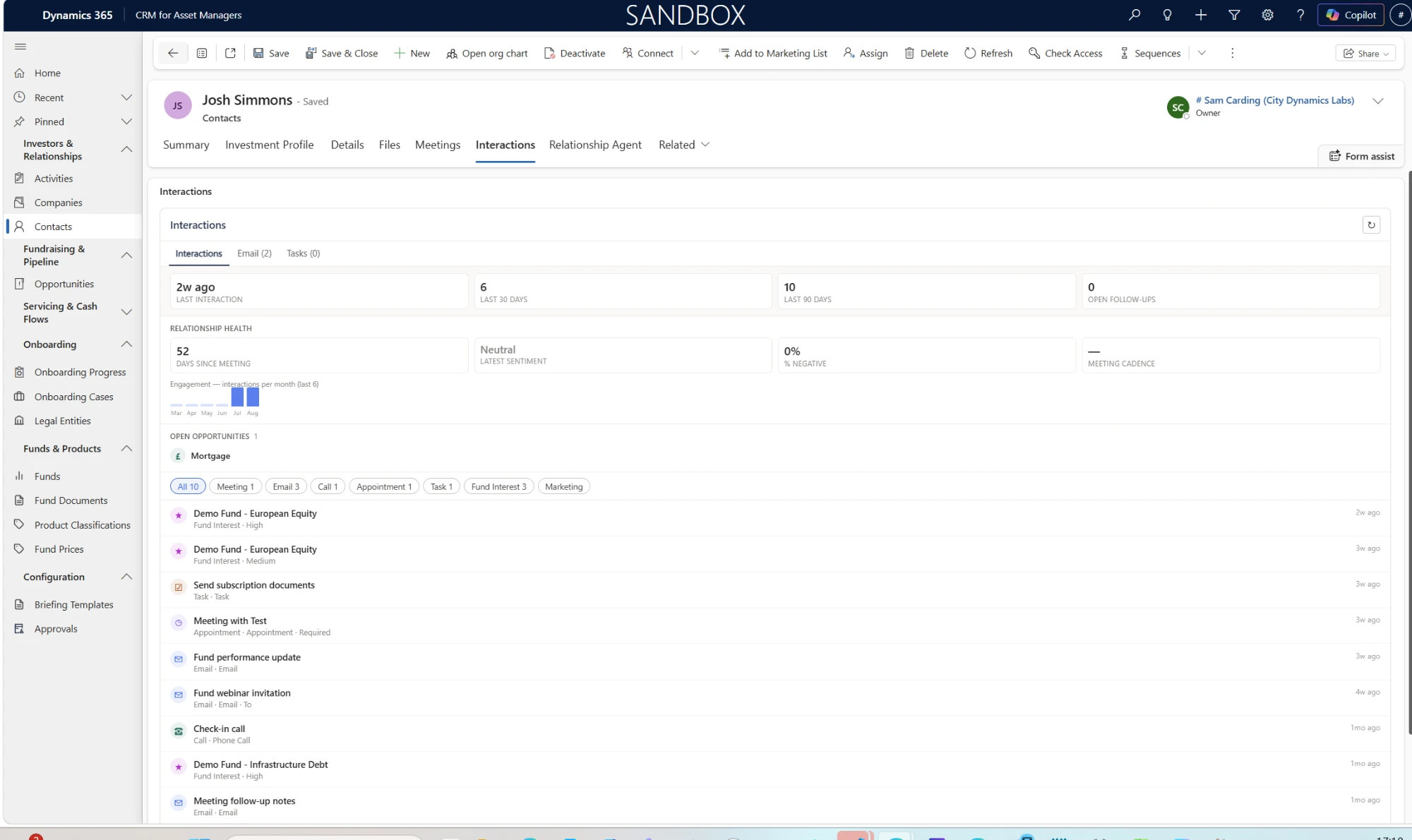
Activity management

Keep investor activity connected to the CRM

Use Dynamics 365 with Outlook and Teams to keep emails, meetings, calls, notes and follow-up actions connected to the relevant investor records.

Track activity from Outlook Associate emails and appointments with investors, contacts and opportunities without leaving Outlook.
See the full interaction history Bring emails, appointments, calls, notes and meeting records together in one place.
Capture useful meeting information Record attendees, key points, decisions, outcomes, next steps and sentiment.
Manage follow-up actions Create and assign tasks from meetings and keep actions visible to the wider team.
Last interaction 18 days ago
Open follow-ups 2 actions
Meeting cadence Quarterly
Contact interaction history
Investor contact interaction history
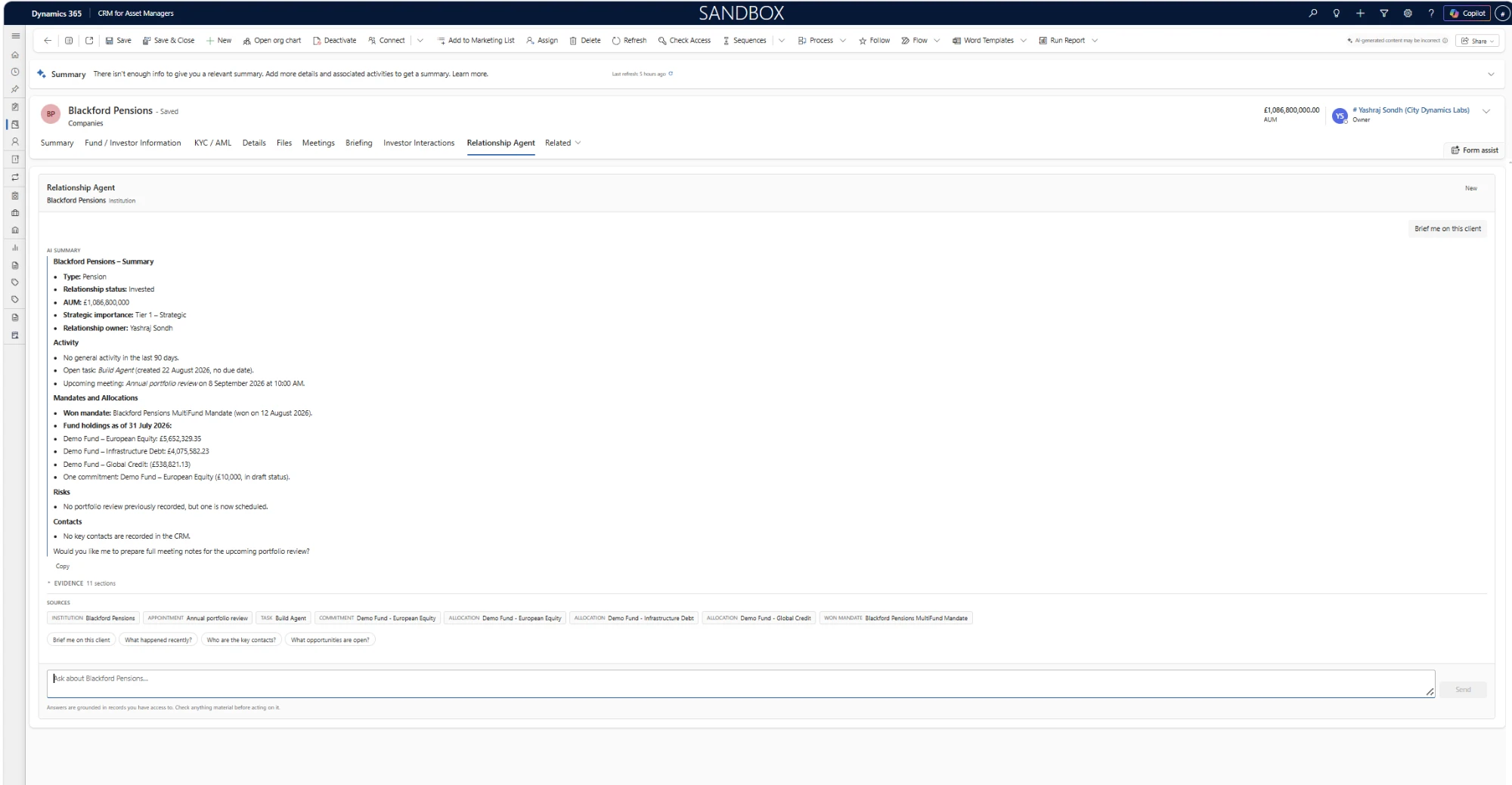
Asset Management Agent

Use the information already in your CRM

The Asset Management Agent helps users prepare for investor conversations and find relevant information held in Dynamics 365.

Asset Management Agent · Blackford Pensions
Looking across CRM records…
What should I follow up on? Who are the key contacts? What opportunities are open?
Proposed CRM update Create a follow-up task for the ESG reporting pack and add a reminder to confirm the next investment committee date.
Prepare for meetings Bring together relevant investor information and recent activity before a meeting.
Find information quickly Ask questions about an investor and retrieve information already held within CRM.
Review before updating Where the agent proposes a CRM change, the user reviews it before anything is updated.
Works within existing permissions The agent only accesses information the signed-in user is already authorised to view.
Asset Management Agent in Dynamics 365
Reporting and analytics

Use the data already captured in CRM

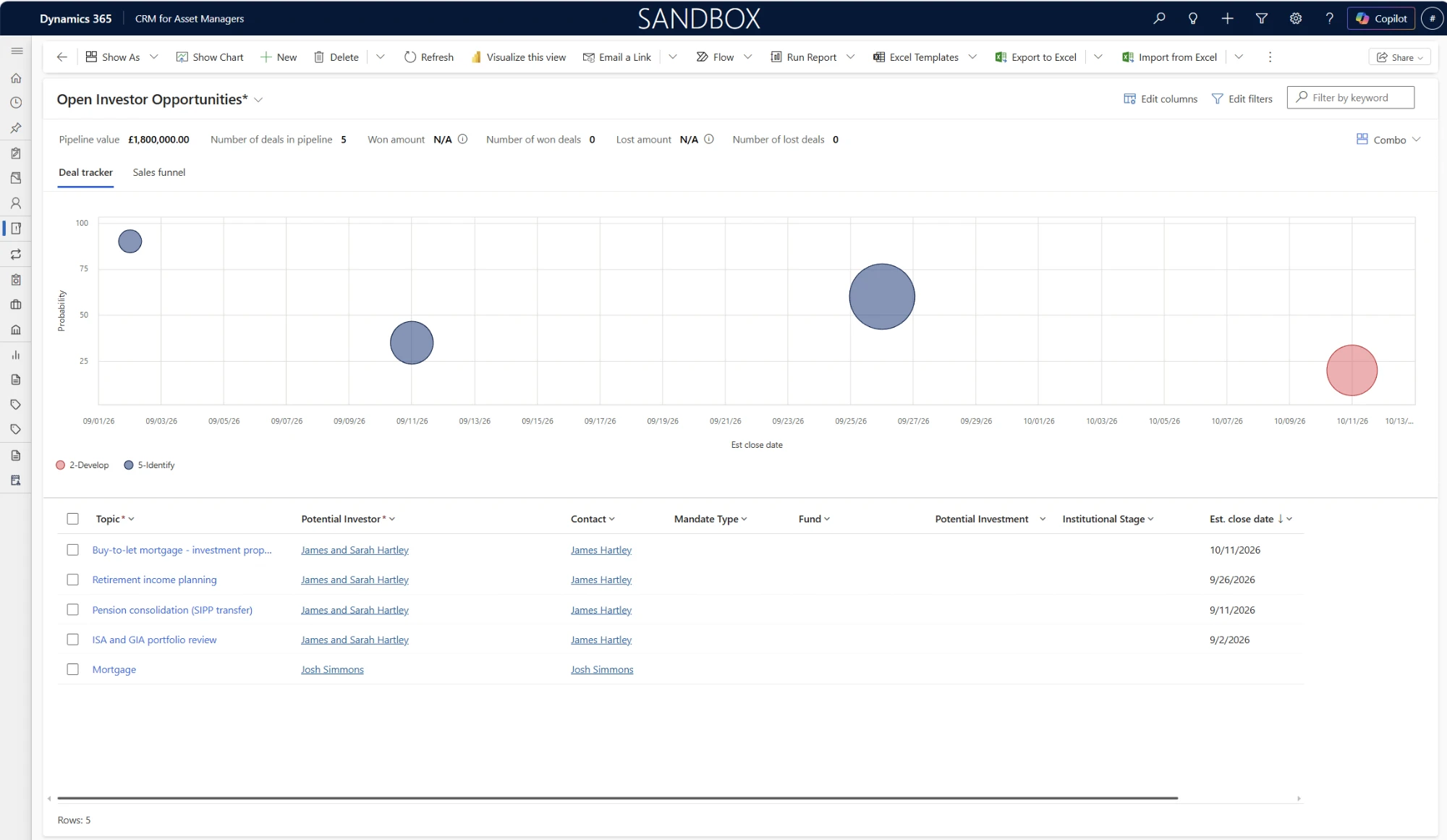
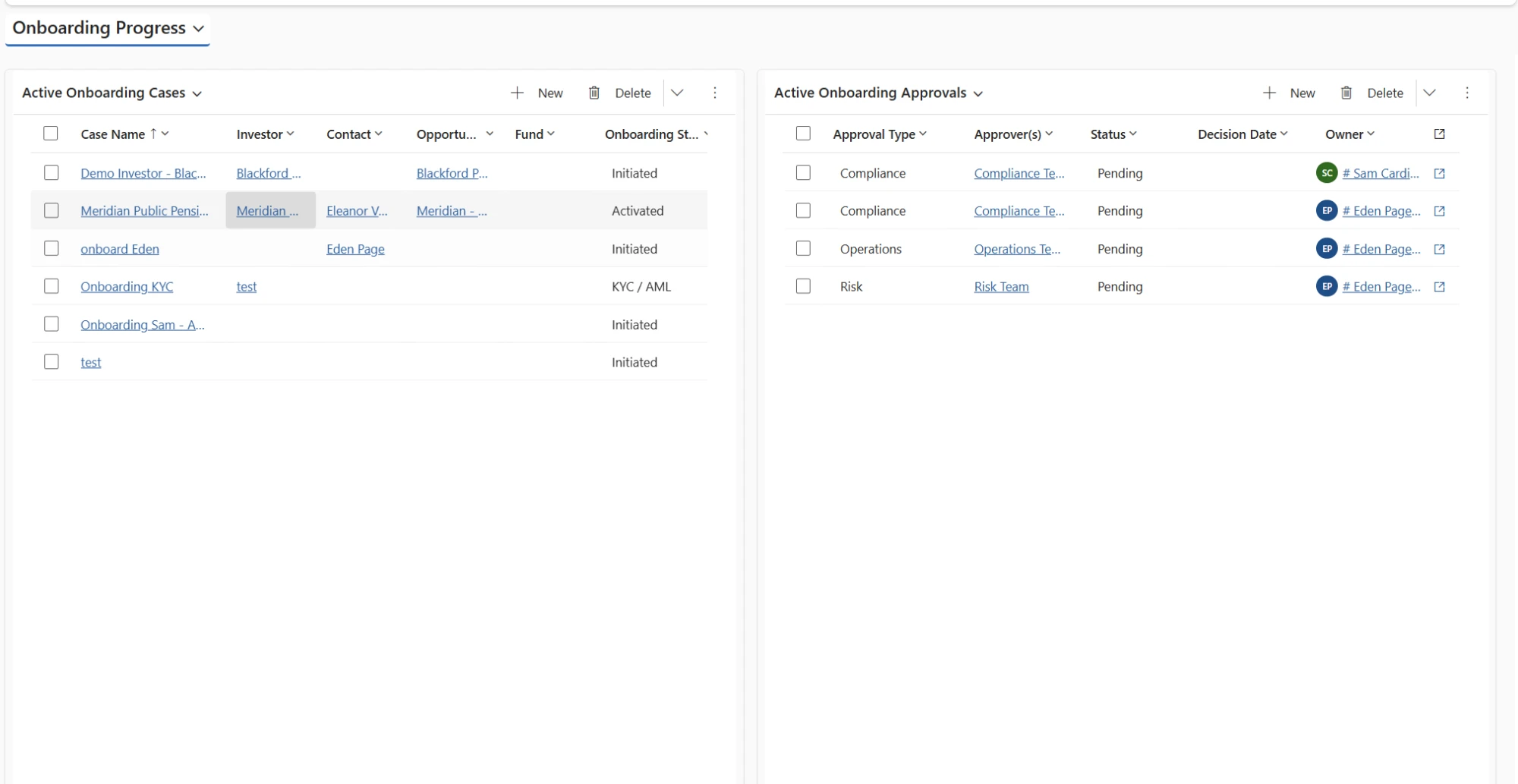
Report on pipeline, investor activity and onboarding using Dynamics 365 dashboards or Power BI.

Open investor opportunities
Investor pipeline and deal tracker
Pipeline
Onboarding progress
Investor onboarding progress dashboard
Onboarding
Microsoft platform

Built on the platform you already use

CRM for Asset Managers is installed within your Microsoft Dataverse environment and uses the existing security and permissions available within Dynamics 365.

Role-based access

Control access for different teams and users, with field-level security available where additional restrictions are required.

Compliance information

Maintain structured information for client classification, KYC and AML, beneficial ownership, approvals and periodic reviews.

Your Microsoft environment

The application is delivered as a managed solution within Dataverse rather than operating as a separate CRM platform.

Frequently asked questions

Questions about CRM for Asset Managers

Yes. The core asset management data model, forms, views, business rules and processes are already built on Microsoft Dynamics 365 and can then be configured for your organisation.
Yes. CRM for Asset Managers extends Dynamics 365 Sales rather than replacing it. Standard records such as Accounts, Contacts and Opportunities continue to be used.
Yes. The solution includes functionality relevant to institutional investment processes as well as individual investor relationships.
The application is installed within your Microsoft environment and its data is held in Dataverse.
The CRM provides structured areas for KYC and AML evidence, beneficial ownership, approvals, client classification and periodic reviews.

See CRM for Asset Managers in action

See how investor management, pipeline, onboarding, activity and the Asset Management Agent work together within Microsoft Dynamics 365.